SSL Certificate Monitoring: The Complete Guide (2026)
TL;DR
SSL certificate monitoring checks more than just expiry dates - it validates the full certificate chain, hostname match, TLS protocol version, and issuer changes. An expired or broken cert triggers a full-page browser warning that blocks every visitor and breaks API connections. Included on all PingPing plans, no add-on needed.
What Is SSL Certificate Monitoring?
SSL certificate monitoring is the practice of automatically tracking the health, validity, and expiration of your site’s SSL/TLS certificates, alerting you before something breaks. It checks whether your certificates are properly configured, haven’t expired, and are actually trusted by browsers and devices.
Think of it this way. You’ve got a certificate that encrypts traffic between your server and your visitors. That certificate has an expiration date. When it expires, or when something goes wrong with the certificate chain, browsers throw up a full-screen warning that says “Your connection is not private.” Visitors leave. Revenue drops. Google notices the bounce rate spike. And if you’re running a SaaS or an e-commerce store, you might not even know it happened until a customer tweets about it.
SSL monitoring exists to prevent that moment entirely.
At PingPing, we check your SSL certificates daily and notify you via email, SMS, Slack, or webhooks when something needs attention. The monitoring runs on autopilot. You configure it once and forget about it until there’s actually something to fix.
Why SSL Monitoring Matters More Than You Think
An expired SSL certificate isn’t just a technical hiccup. It’s a business event.
The second your cert expires, every visitor to your site sees a browser warning. Not a subtle one - a full-page interstitial that actively discourages them from proceeding. Chrome, Firefox, Safari, Edge. They all do it. On Chrome, the warning includes the text “Attackers might be trying to steal your information.” That’s what your customers read instead of your landing page.
Here’s what happens next. Conversion rates go to zero on affected pages. Users who were mid-checkout abandon their carts. API integrations that rely on your SSL certificate start failing: payment webhooks, third-party data syncs, anything that validates your certificate before connecting. If you’re processing payments, you’re now violating PCI DSS compliance requirements, which is a whole separate problem.
And then there’s the SEO angle. HTTPS has been a Google ranking factor since 2014. When your certificate expires, your site effectively becomes HTTP in the eyes of the browser. The cost of that downtime compounds fast. Lost rankings take weeks to recover, not hours.
The irony? All of this is preventable with a monitoring tool that starts at €6/month.
What SSL Monitoring Actually Checks
Not all SSL monitoring is created equal. A basic check just looks at the expiration date. A proper SSL monitor examines the full stack:
Certificate expiration dates. The obvious one. You configure how far in advance you want to be warned: 14 days, 7 days, 3 days or 1 day before expiry, or on expiration day. PingPing lets you pick the threshold that matches your renewal workflow.
Certificate chain completeness. This one catches people off guard. Your SSL certificate doesn’t work alone. It’s part of a chain that goes from your certificate, through one or more intermediate certificates, up to a trusted root certificate authority. If an intermediate cert is missing, your site works fine on most browsers but breaks on some mobile devices and older systems. You won’t see the problem from your laptop. Your users on Android 8 will.
Domain name matching. The certificate needs to cover the exact domain being served. That includes wildcard certificates (*.example.com) and Subject Alternative Name (SAN) certificates that cover multiple domains. A mismatch triggers NET::ERR_CERT_COMMON_NAME_INVALID and blocks access completely.
TLS protocol version. TLS 1.0 and 1.1 are deprecated. Major browsers dropped support for them in 2020. If your server still negotiates on an old protocol, a growing number of connections will fail.
Certificate issuer changes. If your certificate authority suddenly changes without you initiating a renewal, that’s a potential indicator of compromise. Monitoring flags unexpected issuer changes so you can investigate.
What gets checked
SSL monitoring checks more than just expiry
| Check | What it verifies | Without this |
|---|---|---|
| Expiration dates | Certificate is valid and not within the alert threshold (14, 7, 3, or 1 day before expiry, or on expiration day) | Full-page browser warning for every visitor |
| Chain completeness | Leaf, intermediate, and root certificates form an unbroken path to a trusted CA | Silent breakage on mobile and older devices |
| Hostname / SAN match | Common Name and all Subject Alternative Names cover every domain visitors access | Hard block: NET::ERR_CERT_COMMON_NAME_INVALID |
| TLS protocol version | Server negotiates TLS 1.2 minimum; flags deprecated TLS 1.0 and 1.1 | Silent client drop-off as old protocol support is removed |
| Issuer changes | Certificate authority matches the expected issuer for your domain | Unauthorised or misconfigured certificate goes undetected |
Checks run daily - SSL certificates change rarely, so daily cadence catches every issue with days of lead time.
How SSL Certificate Monitoring Works
The mechanics are straightforward. A monitoring service connects to your server on port 443 (or whatever port you specify) and performs a TLS handshake, the same process your visitor’s browser does when loading your site.
During that handshake, the monitor pulls the complete certificate chain and inspects each certificate in it. It checks the validity period, verifies the chain of trust up to the root CA, confirms the domain matches, and evaluates the cipher suites and protocol versions offered by the server.
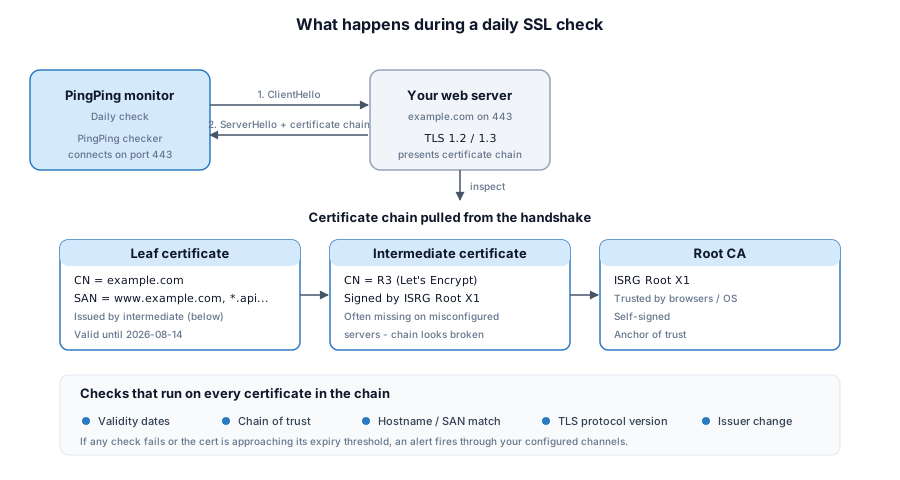
SSL certificates are long-lived and rarely change within a single day. That’s why daily checks are the right cadence for certificate monitoring. Unlike uptime monitoring where 30-second intervals matter because a server can go down at any moment, certificate status doesn’t shift minute to minute. Daily checks catch every issue with plenty of lead time for you to act.
When a check finds something wrong - expiration approaching, broken chain, protocol issue - the system fires a notification through whichever channels you’ve configured. You fix the problem before your visitors ever encounter it.
SSL Expiry Alerts and Status-Change Notifications
SSL expiry alerts warn you before a certificate lapses, usually at several thresholds (14, 7, 3, and 1 day out), so one missed email never turns into an outage. Strong monitoring adds status-change alerts on top. A new issuer, a changed chain, or a swapped certificate each fire a notification the moment they appear, not days later.
Why stagger the reminders? Picture a renewal that quietly fails on a Friday. A single “expires today” alert lands while you’re offline for the weekend, and by Monday every visitor is staring at a security warning. Spread the warnings across two weeks and you get caught the first time, with room to act. That’s the whole point of expiry monitoring: lead time.
Status-change alerts cover what an expiry date can’t predict. If your certificate’s issuer changes when you didn’t request a renewal, that’s worth a look. It might be a misconfigured ACME client, or a certificate someone issued for your domain without your knowledge. A chain that changes shape, a certificate reissued early, a serial number you don’t recognize: all of it is signal. PingPing watches for these and tells you the same day it sees them.
Running more than one domain? You don’t want to log in and eyeball each certificate by hand. A weekly verification sweep across every domain you’ve added, with a single alert stream for expiry and status changes, keeps the whole portfolio honest. Pair it with the step-by-step expiry setup and you’ve got both the early warning and the recovery path covered.
SSL Monitoring vs Uptime Monitoring
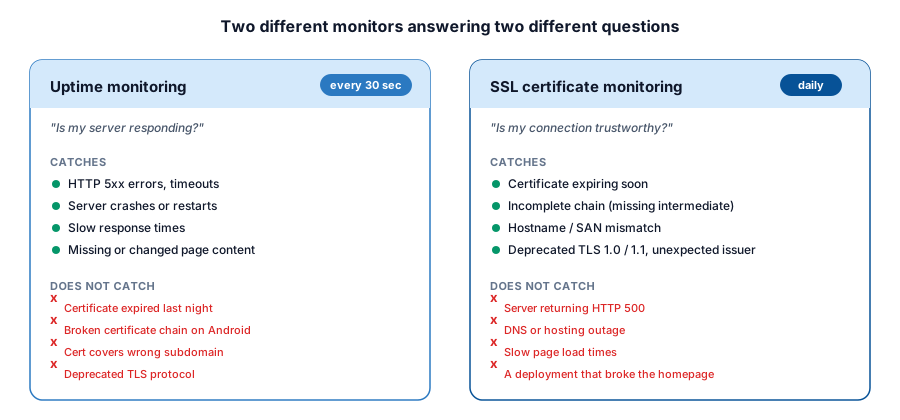
SSL monitoring and uptime monitoring answer different questions. Uptime monitoring checks whether your server responds; SSL monitoring checks whether your certificate is valid and trusted. A site can report 100% uptime while showing a browser security warning because its certificate expired overnight. You need both for full coverage.
Uptime monitoring answers the question: “Is my server responding?” It checks HTTP status codes, verifies response times, and confirms that expected content appears on the page. It runs frequently, every 30 seconds with PingPing, because servers can go down without warning.
SSL certificate monitoring answers a different question: “Is my connection trustworthy?” A site can be fully operational from a server perspective while showing a scary browser warning because the SSL certificate expired last night. Your uptime monitor will report 100% uptime. Your visitors will see a security wall.
The reverse is true too. A valid certificate doesn’t help if the server behind it is down.
PingPing bundles both uptime monitoring and SSL certificate monitoring on every plan. You also get response time tracking and status pages included. No add-on fees for SSL checks like some tools require.
How to Set Up SSL Monitoring in PingPing
Getting started takes under a minute. No configuration wizardry needed.
Step 1: Add your website URL in the PingPing dashboard. Just paste your domain. PingPing automatically detects your SSL certificate. No need to upload cert files or specify ports.
Step 2: Configure your expiration alert threshold. Choose when you want to be notified before your certificate expires: 14 days, 7 days, 3 days, or 1 day, or on expiration day. If you use auto-renewal through Let’s Encrypt or your hosting provider, 3 days is usually plenty. If you renew manually, go with 14 days to give yourself a comfortable window.
Step 3: Set up your notification channels. Pick from email, SMS, Slack, or webhooks. You can configure multiple channels. We recommend at least two, because the one time your cert actually expires will be the one time you didn’t check your email.
That’s it. PingPing runs daily SSL checks alongside your uptime monitoring from that point forward. Both are included on all plans starting at €6/month.
For a deeper walkthrough including notification channel setup and renewal recovery, see our step-by-step guide on monitoring SSL certificate expiration.
Comparing SSL Monitoring Tools: PingPing vs TrackSSL vs UptimeRobot vs Datadog
Choosing an SSL monitoring tool depends on what else you need it to do. Here’s how four popular options compare for SSL certificate monitoring specifically:
| Feature | PingPing | TrackSSL | UptimeRobot | Datadog |
|---|---|---|---|---|
| SSL monitoring | Included on all plans | Core product | Part of HTTP monitoring | Part of Synthetic Monitoring |
| Uptime monitoring | Yes (30-sec intervals) | No | Yes (5-min free, 1-min paid) | Yes (multi-location) |
| Check frequency (SSL) | Daily | Daily | Daily | Configurable |
| Chain validation | Yes | Yes | Basic | Yes |
| Certificate change alerts | Yes (issuer changes) | Yes | No | Yes |
| Status pages | Included | No | Yes (paid) | Yes (paid add-on) |
| Notification channels | Email, SMS, Slack, webhooks | Email, SMS, Slack, Teams | Email, SMS, Slack, + more | Email, Slack, PagerDuty, + more |
| Starting price | €6/mo (SSL included) | Free (2 certs), $17/mo paid | Free (50 monitors), $7/mo paid | ~$5/test/mo (volume pricing) |
| Best for | Solo founders & small teams who need uptime + SSL in one place | Teams that only need SSL monitoring | Budget-conscious teams wanting free uptime + SSL | Enterprise teams already using Datadog’s ecosystem |
PingPing is built for solo founders and small dev teams who want monitoring that covers the essentials without complexity. SSL monitoring is part of every plan. There’s no separate SSL add-on or higher tier to unlock it. You get uptime checks every 30 seconds, daily SSL validation, response time tracking, and status pages, all bundled together from €6/month. If you run a SaaS, a web app, or a client site and you want to know the moment something’s off, this is the straightforward option.
TrackSSL does one thing: SSL certificate monitoring. It’s the specialist. If you manage dozens or hundreds of certificates and you don’t need uptime monitoring (because you handle that elsewhere), TrackSSL’s per-domain pricing makes sense. It also monitors certificate transparency logs, which is unique. The free plan covers 2 certificates. But if you need uptime monitoring too, you’ll need a second tool.
UptimeRobot is the free-tier incumbent. The free plan gives you 50 monitors with 5-minute intervals, and SSL monitoring comes bundled into the HTTP check. For basic SSL expiration alerts, it works. The trade-off: SSL checks on the free plan are less configurable, you won’t get chain validation or issuer change detection, and the check intervals for uptime are slower than what PingPing offers. See our detailed PingPing vs UptimeRobot comparison for a full breakdown.
Datadog is a full observability platform. If your team already uses Datadog for APM, logging, and infrastructure monitoring, adding SSL monitoring through their Synthetic Tests makes sense because it keeps everything in one dashboard. But if you’re a small team that just needs to know when your cert is about to expire, Datadog’s pricing and complexity are overkill. You’d be paying enterprise rates for a feature that costs a fraction elsewhere.
Common SSL Certificate Problems (and How Monitoring Catches Them)
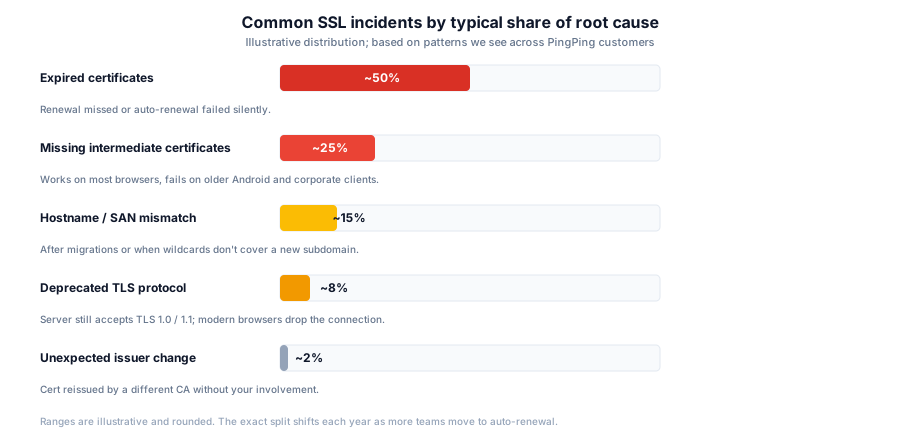
Expired certificates are the most common and most preventable issue. The browser displays “Your connection is not private” and visitors leave immediately. With monitoring, you get notified days or weeks in advance, plenty of time to renew.
Missing intermediate certificates are the sneaky ones. Your site loads fine on your MacBook, in Chrome, on a fresh install. But a user on an older Android phone or a corporate Windows machine gets a trust error. The problem: your server isn’t sending the complete certificate chain, and those devices don’t have the intermediate CA cached. Without monitoring that validates the full chain, you’d never know.
Domain name mismatches happen after migrations, subdomain changes, or when a wildcard certificate doesn’t cover a specific subdomain you added. The result is a hard block - browsers won’t let users through at all.
Deprecated TLS protocols are a slow-motion problem. Your server might still accept TLS 1.0 connections today, but browser after browser is dropping support. One day, a percentage of your users can’t connect anymore. Protocol version monitoring catches this before it’s customer-facing.
Unexpected certificate authority changes can indicate that someone issued a certificate for your domain without your knowledge. That’s either a configuration mistake or something worse. Monitoring for issuer changes adds a security layer beyond just tracking expiration.
Weak cipher configurations don’t throw an expiry warning, but they make your site vulnerable to known attacks, and modern browsers may refuse the connection altogether. Self-signed certificates that slip into production are worse: every visitor sees a full-page security warning they have to manually bypass, and search engines may stop indexing the site. Mixed content is the quiet one - even a single HTTP resource on an HTTPS page triggers browser warnings and can break page functionality.
Certificate authority trust problems are rare but brutal. If a CA is distrusted by the browser vendors - as happened with Symantec, where Chrome and Firefox gradually removed trust over 2017-2018 - every certificate it issued eventually becomes invalid, regardless of its expiration date. Monitoring issuer details means you find out you’re affected before your users do.
Understanding Certificate Types
Not every certificate offers the same level of validation, and the type you choose affects both trust signals and how quickly you can issue one:
Domain Validated (DV) certificates offer basic encryption and are issued quickly after proving domain ownership. They’re suitable for basic websites and testing environments but provide minimal trust indicators to users.
Organization Validated (OV) certificates require verification of the organization’s identity, providing a higher level of trust. They’re appropriate for business websites and applications where user trust is important.
Extended Validation (EV) certificates undergo the most rigorous validation process. They used to trigger a green address bar in browsers, but major browsers removed that visual indicator in 2019. EV certs still verify organization identity, which matters for e-commerce and banking, but the visible trust difference for end users is gone.
Validation levels
Three levels of SSL certificate validation
All three deliver HTTPS and an identical padlock. They differ in how thoroughly the CA verifies you behind the scenes - which is what the cost and lead time pay for.
- DV
Domain Validated
Proves you control the domain, nothing else.
- What's verified
-
- Domain ownership
DNS or HTTP challenge
- Time to issue
- Minutes
Often fully automated
- Typical use case
-
Blogs, SaaS dashboards, APIs
Let's Encrypt, most managed platforms
- OV
Organization Validated
Proves your domain plus your registered business.
- What's verified
-
- Domain ownership
- Registered business name
Manual check of registry records
- Time to issue
- 1 to 3 days
Human review required
- Typical use case
-
Business websites, B2B portals
Most commercial CAs
- EV
Extended Validation
Strictest vetting. The original "green bar" tier.
- What's verified
-
- Domain ownership
- Legal entity verification
- Physical address audit
Multi-step audit per CA/Browser Forum rules
- Time to issue
- 1 to 2 weeks
Documents, phone callbacks, signed forms
- Typical use case
-
Banking, finance, payments
Specialist CAs with EV programmes
From a browser's perspective, all three deliver the same padlock and the same encryption strength. EV no longer triggers a green address bar (dropped in 2019).
Best Practices for Certificate Management
Keep an inventory of every certificate you have in production. This sounds obvious, but many teams lose track once they’re running multiple subdomains, staging environments, and API endpoints. A monitoring tool like PingPing doubles as a living inventory. Every domain you add is tracked automatically.
Use auto-renewal whenever possible. Let’s Encrypt certificates expire every 90 days by design, pushing the industry toward automation. If you’re on a platform that supports auto-renewal (most modern hosting providers do), enable it. Then use monitoring as your safety net, because auto-renewal scripts do fail. The cron job stops running. The DNS validation breaks after a migration. You want to know when the automation didn’t work, not when your users do.
Set up at least two notification channels. Email plus Slack, or SMS plus a webhook. Redundancy matters here because the consequence of missing an alert is a visible site-wide incident.
Don’t ignore chain issues. If your monitoring reports a chain validation warning, fix it immediately even if your site appears to work. You’re seeing it work on your device. Others aren’t.
Review your TLS configuration annually. Cipher suites and protocol versions that were acceptable last year might be deprecated this year. Stay on TLS 1.2 minimum, prefer TLS 1.3, and disable anything older.
Short-Lived Certificates: Why Monitoring Matters More Every Year
Certificate lifetimes are shrinking fast. In April 2025 the CA/Browser Forum voted to cut the maximum TLS certificate lifetime from 398 days to 47 days by 2029. The steps land in March 2026 (200 days), March 2027 (100 days), and March 2029 (47 days). Let’s Encrypt already issues 90-day certificates, and short-lived options as brief as 6 days now exist.
What does that mean in practice? More renewals, more often. A certificate you used to touch once a year becomes something that rotates every few weeks. Every one of those renewals is a fresh chance for an ACME client to fail silently, a DNS validation to break after a migration, or a deploy to ship the old certificate. Automation handles the happy path. Monitoring is what catches the renewal that didn’t happen.
This is the part teams underestimate. Shorter lifetimes don’t just mean “renew more often.” They shrink the gap between a broken renewal and a site-wide warning, because the certificate was only ever valid for a few weeks to start with. Daily SSL checks with expiry and status-change alerts turn that risk back into a non-event: you hear about the failed renewal long before the certificate actually lapses. If you set your alert threshold back when certificates lasted 398 days and haven’t touched it since, go and change it - our guide to monitoring SSL certificate expiration has the number that fits each lifetime.
Troubleshooting Certificate Issues
When something breaks, walk it in order. First, confirm the actual error in a fresh browser (private window, no cache) or via openssl s_client -connect yourdomain.com:443 -servername yourdomain.com so you’re debugging the real response, not a cached one. Most fixable problems fall into three buckets:
Expired or near-expired certificate. Renew via your CA or ACME client, then reload the web server. PingPing will confirm the new expiry on the next daily check.
Missing intermediate certificate. Your fullchain file is incomplete. Concatenate the leaf cert with the CA’s intermediate bundle and reload. Some clients trust it without the intermediate; others don’t, which is why it shows as “works for me, broken for them.”
Domain mismatch. The cert covers example.com but not www.example.com (or vice versa). Reissue with both names or a wildcard.
If none of these apply, run the URL through SSL Labs’ server test to spot configuration problems - deprecated TLS versions, weak ciphers, missing HSTS - without trial-and-erroring on production.
Related guides
How to monitor SSL certificate expiration
A step-by-step walkthrough of setting up expiry alerts, notification channels, and renewal recovery.
What happens when your SSL certificate expires?
The exact sequence of browser warnings, API failures, and SEO damage that follows a missed renewal.
What is uptime monitoring?
How 30-second checks catch server outages before your users notice anything is wrong.