Website Monitoring for Solo Founders and Small Teams
TL;DR
As a solo founder you can’t watch dashboards 24/7 - automated 30-second monitoring with multi-channel alerts is your ops team. Focus on four things: uptime, response time, SSL certificates, and your domain. Set alerts to fire only on confirmed outages so your phone rings when it actually matters.
Why Monitoring Matters When You’re Solo
It’s 3am and your SaaS is down. You’re asleep. A customer discovers the outage at 6am, tweets about it, and by the time you wake up at 8am, you’ve lost 5 hours of uptime and several customers’ trust. Nobody paged you. Nobody restarted the server. Nobody even knew.
This is the reality of running a product without monitoring. And for solo founders, it happens more often than anyone admits.
When you’re a team of one, you are the ops team, the support team, and the CEO. You can’t watch a dashboard 24/7. You can’t manually check your site every hour. You need something watching your site for you. Something that catches problems in seconds and wakes you up only when it matters.
Website monitoring is the single most important safety net a solo founder can set up. It takes minutes to configure and runs silently in the background, so you can focus on building instead of babysitting servers.
What Should You Monitor?
You don’t need to monitor everything. As a solo founder or small team, focus on four areas that cover most of what can go wrong.
Solo founder essentials
Four checks, all green
This is what good monitoring looks like at a glance. Four checks, each with a clear signal of whether something needs your attention.
- UptimeOperational
Is your site accessible right now?
Catches server crashes, DNS failures, and hosting outages. Without uptime monitoring, you rely on customers to tell you - most just leave.
- Response timeFast
Is your site fast enough?
A site can be up but so slow that users give up. Performance degradation is a silent conversion killer.
- SSL certificateValid
Valid and not about to expire?
Expired certs trigger full-page browser warnings. Monitoring reminds you days before expiry so you never face that screen.
- Status pageLive
Are users informed when something breaks?
A public status page builds trust during incidents and reduces "is it just me?" support volume.
How Often Should You Check?
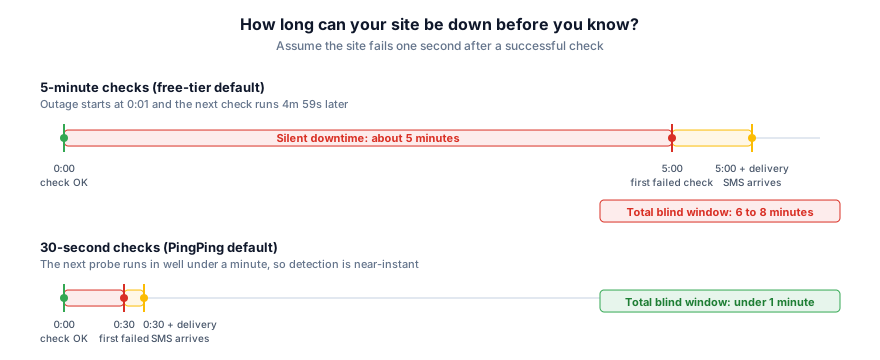
The check interval you choose directly determines how long an outage can go undetected. This is not a minor configuration detail. It is the difference between catching a problem in 30 seconds and missing it for 10 minutes.
Many free-tier monitoring tools default to 5-minute checks. That sounds reasonable until you do the math. If your site goes down one second after a check, you won’t know for nearly 5 minutes. Add notification delivery time and you’re looking at 6 to 10 minutes of silent downtime. For a solo founder who then needs to wake up, diagnose, and fix the issue, total downtime can easily stretch past 30 minutes.
30-second monitoring changes the equation entirely. Worst-case detection drops to under a minute. You get alerted faster, you respond faster, and total downtime shrinks dramatically. For solo founders, this is especially critical because you are the only person who can fix the problem. Every second of detection delay is a second added to total resolution time.
Setting Up Alerts That Don’t Overwhelm
Here’s a mistake almost every solo founder makes early on: they set up monitoring, enable every alert channel, and within a week they’re ignoring all of them. Too many alerts leads to alert fatigue, and alert fatigue leads to missing the one notification that actually matters.
The goal is not more alerts. It is better alerts. Here’s how to set them up properly:
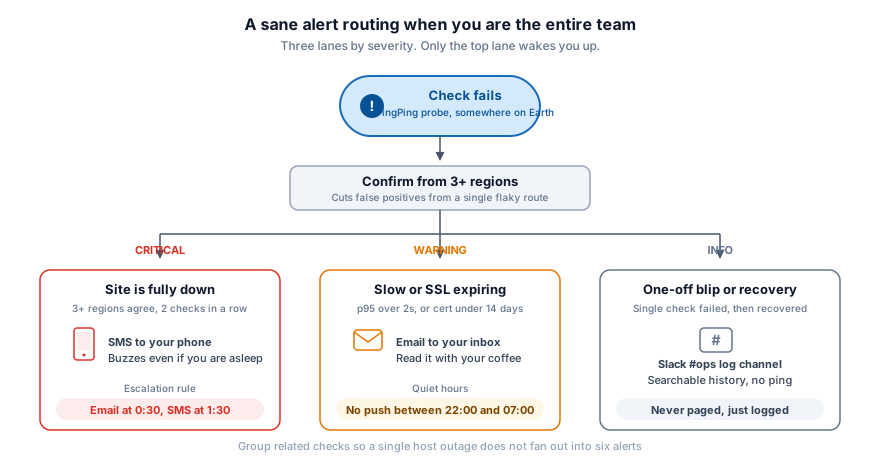
- Use multi-channel alerts with purpose: SMS for critical outages that need immediate attention. Email for informational alerts like performance degradation or upcoming SSL expiry. Slack or webhook for logging. Each channel should have a clear severity level attached to it.
- Set up escalation: Send an email first. If the site is still down after a few minutes, escalate to SMS. This prevents your phone from buzzing every time there’s a brief hiccup while ensuring real outages get your attention.
- Only alert on confirmed outages: A single failed check could be a network blip, not a real outage. Good monitoring tools verify from multiple locations before triggering an alert. PingPing checks from several global locations simultaneously, so you only get notified when there’s a genuine, confirmed problem and not a false alarm from one flaky route.
- Group related alerts: If your main domain and API subdomain both go down because your hosting provider is having issues, you don’t need six separate alerts. Grouping related checks prevents notification overload during major incidents.
The right alert setup means you can sleep soundly knowing that if something breaks, your phone will ring. And when your phone rings, it actually means something.
The Real Cost of Not Monitoring
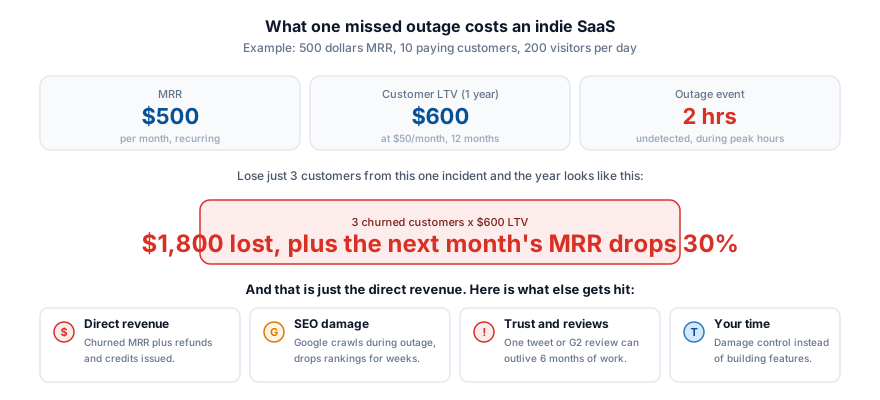
When you’re running a small operation, every single customer matters disproportionately. Losing one user out of a hundred is far more painful than losing one out of a million. And undetected downtime is one of the fastest ways to lose customers you worked hard to acquire.
Consider the math. If your SaaS is at $500/month MRR and a customer is worth $50/month, that’s $600/year per customer. An undetected 2-hour outage during peak hours could cost you several customers. Not from the outage itself, but from the perception that nobody is paying attention. Users don’t churn because of one bad experience. They churn because they lose confidence that the product is reliable and maintained.
Beyond direct revenue, there’s the hidden cost of downtime: damaged SEO rankings when Google encounters errors during crawling, negative reviews and social media posts that persist long after the outage is resolved, and the hours you spend doing damage control instead of building features. For solo founders, that last one stings the most. Your time is your scarcest resource.
Choosing the Right Monitoring Tool
Not every monitoring tool is built for solo founders. Many are designed for large engineering teams with complex infrastructure, and that complexity shows in setup time, pricing, and interface clutter. As a solo founder or small team, here’s what to look for:
- Simplicity: You should be able to add a site and start monitoring in minutes, not hours. No YAML configs, no agent installations, no infrastructure to manage.
- Fast check intervals: 30-second checks should be standard, not a premium upsell. Detection speed matters most when you’re the only one responding.
- Multiple alert channels: SMS, email, Slack, webhooks - you need options to build an alert workflow that fits your life, not just your work.
- Status page included: A built-in status page means one less tool to manage. When you’re solo, every tool you can eliminate from your stack saves cognitive overhead.
- Affordable pricing: Monitoring should not be a major line item. You need professional-grade coverage at indie-founder pricing.
PingPing was built specifically for founders and small teams. One tool that covers uptime, response time, SSL, and status pages. No enterprise complexity, no surprise charges. See how it compares to UptimeRobot, Pingdom, Better Stack, or browse the full comparison page.
Getting Started in 2 Minutes
Setting up monitoring does not need to be a weekend project. With PingPing, the whole process takes about two minutes:
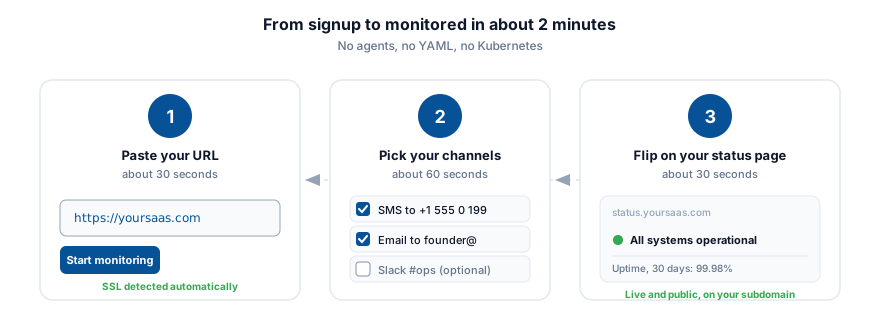
- Sign up and add your URL. That’s the only required step. PingPing starts checking your site immediately.
- Configure your alerts. Choose where you want to be notified: email, SMS, Slack, or all three. Set escalation rules that match how you work.
- Enable your status page. Give your users a place to check service health without emailing you directly.
From that moment on, your site is monitored every 30 seconds from multiple global locations. You’ll know about problems before your customers do - and that’s the whole point.
Related guides
What is uptime and downtime?
A clear explanation of how uptime is measured, what counts as downtime, and why the difference matters for your product.
Uptime SLA explained
What “99.9% uptime” actually means in minutes of downtime per year, and how SLA commitments work in practice.